Minimal Space. Maximum Impact! Designed for when every millimeter matters> the new IRONLESS UNANO SERIES
Semiconductors
Increase throughput and precision of your system
Display
Enhance accuracy and precision with linear motors
Science and aerospace
Improve motion quality for a variety of applications
Machine tooling
Robust solutions for increased speed and precision
Digital cutting
Create modular and high throughput applications
Printing
Increase printing speed and quality using linear motors
Robotics
Integrate compact solutions for guaranteed uptime and high dynamics
Life science
Establish precise and clean integrated solutions
Woodworking
Maximize performance and accuracy for high throughput
Stages and system solutions
Compact integration and high performance for your axis
Vacuum applications
Best performance for clean and vacuum applications
Characteristics
Choosing an Industrial Personal Computer is not simply a specification exercise. It is a reliability decision made under heat, vibration, dust, and operational pressure.
Allied Market Research estimates that the global industrial PC market could grow from approximately USD 5.1 billion in 2021 to USD 8.7 billion by 2031. This expansion reflects wider automation, machine vision, edge analytics, and connected production systems. Gartner has also reported that 75% of enterprise-generated data would be created and processed outside traditional data centers or cloud environments by 2025. That shift increases the need for dependable computing near machines, sensors, and control panels.
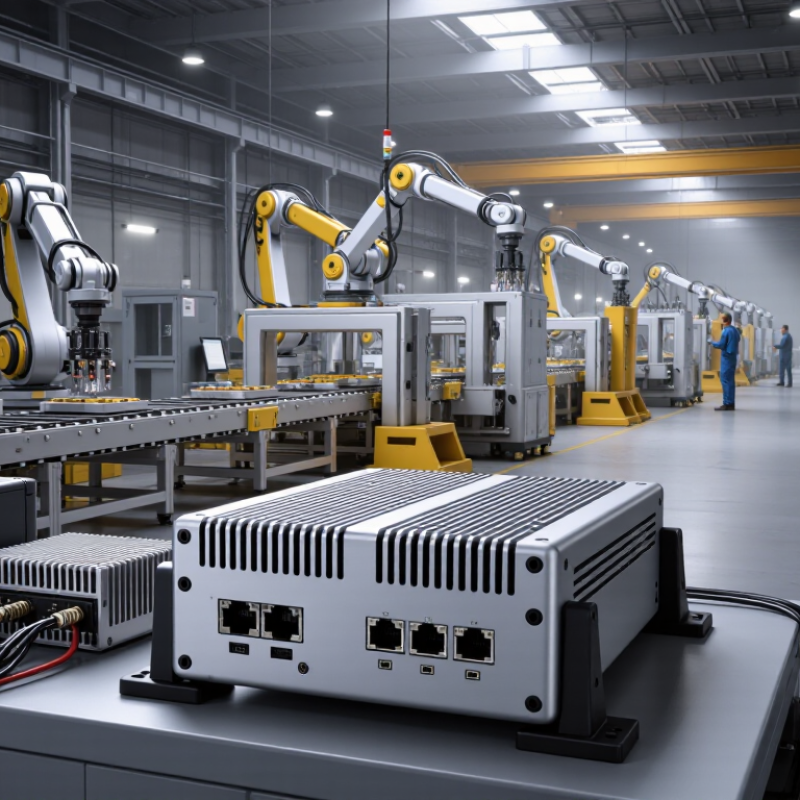
The correct computer depends on its working environment. A factory floor may demand fanless cooling, wide-temperature operation, sealed enclosures, and resistance to vibration. A logistics installation may prioritize dual Ethernet ports, compact mounting, and long-term availability. A vision system may need stronger CPU or GPU performance, while a basic controller may not.
Specifications can mislead.
A higher processor speed does not guarantee better field performance. Poor airflow, unstable power, or unsuitable storage can reduce reliability faster than moderate processing demands. Buyers should examine operating temperature, ingress protection, memory expandability, storage endurance, interface compatibility, cybersecurity support, and product lifecycle commitments. IEC 60068 environmental testing can offer useful evidence, but test conditions may not perfectly match a real production line.
There is no universal best model. Even experienced teams sometimes overbuy performance and underinvest in maintenance planning. A practical choice connects measured workload data with actual site conditions, service access, and future expansion. That balance creates an Industrial Personal Computer that performs consistently, rather than one that only looks powerful on paper.
How to Choose an Industrial Personal Computer?
Define the IPC Workload Using ISA-95 and 24/7 Duty-Cycle Requirements
Selecting an industrial personal computer should begin with the production role, not the processor. ISA-95 helps map that role across enterprise, site, area, work center, and equipment levels. An IPC supporting plant-wide monitoring faces different demands than one controlling a packaging station. Define its position clearly.
At the equipment level, the workload may include sensor collection, protocol conversion, local visualization, alarm handling, and machine learning. At the work-center level, it may exchange data with manufacturing execution systems and historians. Record the number of devices, sampling rates, network connections, screen resolutions, and required response times. Small details matter.
Continuous operation changes the selection criteria. A 24/7 IPC needs stable thermal performance, industrial storage, memory with error protection, and a watchdog function. Check operating temperature, vibration tolerance, dust exposure, and power quality. Plan for automatic recovery after a brief outage. Avoid treating peak CPU usage as the whole workload.
In practice, I once underestimated storage writes from event logs and temporary files. The processor remained comfortable, but the drive became the weak point. That mistake was avoidable. Measure real workloads during shift changes, alarm bursts, and network interruptions. Leave capacity for software updates and future sensors, but do not oversize every component without evidence. Reliable engineering includes admitting where the estimate is uncertain.
| ISA-95 Area / Selection Dimension | Typical IPC Workload | Recommended Baseline Specification | 24/7 Duty-Cycle Requirement | Verification Criteria |
|---|---|---|---|---|
| Level 0–1: Field Devices and Basic Control | Signal acquisition, sensor monitoring, actuator control, protocol conversion, and local HMI functions. | 2–4 CPU cores, 4–8 GB RAM, industrial solid-state storage, isolated digital and analog I/O, and at least one industrial Ethernet interface. | Designed for continuous operation at 100% availability target; passive cooling is preferred where dust, vibration, or maintenance access is a concern. | Confirm scan time, I/O response time, protocol support, watchdog functions, and operation at the specified ambient temperature. |
| Level 1–2: Supervisory Control and HMI/SCADA | Graphical HMI, alarm management, trend visualization, historian buffering, recipe display, and operator authentication. | 4–8 CPU cores, 8–16 GB RAM, 256 GB or larger industrial SSD, dual independent network ports, and support for multiple displays if required. | Use components rated for continuous operation; select storage with sufficient endurance for frequent event, alarm, and trend writes. | Measure screen refresh performance, alarm latency, concurrent tag count, display resolution, storage write rate, and recovery after power interruption. |
| Level 2: Production Monitoring and Data Collection | Collection of equipment data, OEE calculations, production dashboards, batch records, local analytics, and edge data preprocessing. | 6–8 CPU cores, 16–32 GB RAM, 512 GB or larger industrial SSD, redundant network paths where necessary, and time-synchronization support. | Allow thermal and compute headroom of at least 20–30% above measured peak demand to support long unattended operation and software growth. | Test peak tag rates, database transaction rates, network utilization, time synchronization, local buffering, and data integrity during link outages. |
| Level 3: Manufacturing Operations Management | Scheduling support, quality records, traceability, inventory transactions, electronic work instructions, and integration with plant systems. | 8 or more CPU cores, 16–32 GB RAM, 512 GB–1 TB industrial SSD, multiple network interfaces, secure boot capability, and hardware monitoring. | Use a platform with long-life component availability, predictable thermal behavior, and a defined replacement strategy for continuous plant operation. | Validate simultaneous users, database workload, interface throughput, backup and restore time, cybersecurity controls, and failover procedures. |
| Level 3–4: Plant-to-Enterprise Integration | Secure exchange of production, quality, maintenance, and inventory data between plant applications and enterprise systems. | 8–16 CPU cores, 32 GB RAM or more, 1 TB or larger industrial storage, segmented network interfaces, virtualization support, and hardware security features. | Provide redundancy or rapid replacement where downtime affects multiple production lines; maintain capacity for patches, agents, and integration services. | Check virtual machine performance, encrypted traffic load, API or database throughput, network segmentation, patch compatibility, and disaster recovery objectives. |
| CPU and Real-Time Responsiveness | Control loops, protocol stacks, visualization, analytics, cybersecurity services, or multiple workloads running concurrently. | Select industrial-grade processors with sufficient single-thread and multi-thread performance; reserve 20–30% CPU capacity at the measured peak. | Avoid sustained operation near the processor's thermal limit; verify performance under the highest expected ambient temperature. | Record average and 95th/99th percentile CPU utilization, interrupt latency, application response time, and thermal throttling events. |
| Memory Capacity and Reliability | Operating system, HMI applications, databases, edge analytics, virtual machines, and security software. | Use 8 GB for basic control, 16 GB for standard supervisory workloads, and 32 GB or more for analytics, databases, or virtualization; ECC memory is preferred for critical systems. | Maintain at least 20% free memory during peak operation and use memory diagnostics suitable for continuous-duty systems. | Monitor memory pressure, paging activity, application leaks, ECC error logs where available, and restart behavior after extended operation. |
| Industrial Storage and Data Retention | Operating system, event logs, trend data, recipes, batch records, local databases, and temporary communication buffers. | Use industrial SSDs with power-loss protection where data integrity is important; provide 256 GB–1 TB according to retention period and write workload. | Estimate total bytes written over the service life, maintain at least 20% free capacity, and define scheduled backup or replacement procedures. | Calculate daily write volume, check endurance rating, test recovery after power loss, and verify backup restoration time. |
| Networking and Protocol Connectivity | Industrial Ethernet, fieldbus gateways, controller communication, supervisory data exchange, and enterprise integration. | Provide 2–4 network interfaces as required, support deterministic or industrial protocols where applicable, and separate control, monitoring, and enterprise traffic. | Use link monitoring, redundant paths, or local buffering when communication loss can interrupt production or cause data gaps. | Measure bandwidth utilization, packet loss, jitter, reconnection time, protocol latency, and behavior during network segmentation events. |
| Environmental and Mechanical Conditions | Operation in control cabinets, production areas, machine enclosures, or locations exposed to dust, vibration, humidity, and temperature variation. | Select the enclosure, cooling method, mounting system, ingress protection, vibration tolerance, and temperature rating according to the installation site. | Verify continuous-duty thermal performance at the maximum site temperature and account for cabinet heat, airflow restrictions, and dust accumulation. | Confirm operating temperature, humidity, vibration, shock, altitude, ingress protection, electromagnetic compatibility, and allowable cooling clearance. |
| Power, Restart, and Availability | Continuous operation with controlled shutdown, automatic restart, remote monitoring, and recovery after short power disturbances. | Use an industrial power input suitable for the plant supply, watchdog timer, hardware monitoring, and UPS support where process continuity is essential. | Define recovery time objectives, safe shutdown behavior, automatic boot requirements, and replacement procedures before deployment. | Test brownouts, power cycling, unexpected shutdown, automatic restart, application recovery, clock retention, and data consistency. |
| Lifecycle, Serviceability, and Validation | Long-term deployment where software updates, spare parts, configuration control, and maintenance access affect total cost of ownership. | Choose documented hardware revisions, accessible storage and memory where appropriate, remote diagnostics, secure update capability, and a defined service life. | Plan preventive maintenance, spare-unit availability, configuration backups, and periodic health checks without interrupting production unnecessarily. | Complete a 72-hour or longer representative stress test, confirm thermal stability, review system logs, and document acceptance limits. |

Note: The specifications are practical planning ranges rather than universal requirements. Final IPC selection should be based on measured peak workload, site conditions, required availability, software compatibility, and the applicable installation standards.
Choosing an industrial personal computer starts with the workload, not the processor label. Count sensor signals, camera streams, control loops, and software services running together. A dual-core CPU may handle simple monitoring. It can struggle when vision analysis and motion control share resources. For real-time tasks, measure worst-case latency, not average speed. Short delays can disturb a fast control loop.
RAM needs depend on data movement. A system collecting temperature values may need little memory. High-resolution images, databases, and virtual machines require much more. Leave practical headroom, often 25 to 40 percent. This reduces slowdowns during alarms or maintenance access. More RAM is not always better. Poorly configured software can waste it.
Storage should match both capacity and write behavior. Frequent event logs can wear unsuitable storage quickly. Select an industrial-rated option and check sustained write speed. Keep the operating system separate from growing production data when possible.
I have seen promising installations fail because storage filled quietly. That detail was missed. Test the computer with real I/O modules, network traffic, and cabinet heat. Synthetic benchmarks can look excellent, yet real workloads expose timing spikes. A spreadsheet estimate may still be wrong. Review recorded loads after deployment and adjust the design before expansion.
How to Choose an Industrial Personal Computer?
Select the enclosure by its real environment, not by appearance. IEC 60529 defines IP protection against solids and water. For example, IP65 indicates dust-tight protection and resistance to water jets. IP67 adds temporary immersion protection under specified conditions. These ratings describe the enclosure, not every installed connector. Cable glands, cooling vents, and damaged seals can reduce protection quickly. Check the complete assembly.
IEC 60068 testing addresses environmental stress. Relevant methods may include dry heat, cold, damp heat, vibration, shock, and temperature cycling. A computer beside a stamping machine needs different evidence from one inside a clean control cabinet. Ask for test conditions, duration, mounting details, and sample configuration. Otherwise, a passing result may be difficult to apply to your installation. Details matter.
In practice, inspect the mounting surface and cable routing before choosing an IP level. A sealed enclosure may trap heat around the processor. That trade-off is easy to miss. Review operating temperature limits and airflow requirements alongside the IP rating. If the system faces oil mist, salt air, or repeated washdown, request additional material and corrosion information. I would also repeat critical checks after installation, because field assembly is rarely as perfect as laboratory testing.
How to Choose an Industrial Personal Computer?
Verify Expansion, Ethernet, Fieldbus, and PCIe Connectivity Needs
Choosing an industrial personal computer starts with the machine’s communication map, not the processor name. List every sensor, drive, camera, controller, and service port. Then check how each device connects. A system may need dual Ethernet for separated networks, while a production cell may require three or more ports. Keep traffic paths clear. Network congestion can appear during maintenance, not during factory testing.
Fieldbus requirements deserve careful attention. Identify the exact protocol, connector type, isolation level, and cycle-time target. A software adapter may look convenient, but it can add delay or increase troubleshooting time. I once treated a spare Ethernet port as enough for future expansion. That assumption was wrong. Fieldbus hardware and licensing were later required. Leave room for change.
PCIe connectivity also needs physical verification. Count available slots, confirm lane allocation, and measure the card length before installation. Check whether the enclosure can remove heat from high-power cards. A compact chassis may accept a card electrically but reject it mechanically. It happens. Expansion cards can also block nearby connectors or reduce airflow. Review the power budget, operating temperature, vibration limits, and cable-bending space. Test the complete configuration with real devices, sustained network traffic, and startup cycles. Datasheets guide the decision, but factory conditions reveal its weak points.
Compare the nominal signaling rates of common industrial connectivity options when verifying Ethernet, fieldbus, expansion, and PCIe requirements. Actual performance depends on cable length, topology, protocol overhead, device capability, and environmental conditions. PCIe bandwidth is shown per lane and per direction.
Choosing an industrial personal computer requires more than comparing processor speed. MTBF is useful, but it is not a guarantee of five years without failure. NIST’s Engineering Statistics Handbook describes MTBF as a repairable-system reliability measure, not a warranty promise. Ask how the figure was calculated, under which temperature, vibration, and workload conditions. Numbers can mislead.
Five-year availability Five-year availability depends on parts continuity, firmware support, and repair procedures. Request written evidence that replacement units and critical components will remain available for five years. The Uptime Institute’s 2023 Annual Outage Analysis reported that 60% of serious outages cost at least 100,000 US dollars. For a production line, one unavailable computer can stop inspection, logging, or motion control. Keep spares nearby.
Maintenance design and total cost of ownership Maintenance design directly affects total cost of ownership. A fanless enclosure may reduce dust-related cleaning, while accessible storage and standardized connectors can shorten service visits. The U.S. Department of Energy’s Operations and Maintenance Best Practices Guide cites potential savings of 8–12% from preventive maintenance, compared with reactive methods. Calculate purchase price, installation labor, spare inventory, energy use, software support, and downtime. I would not trust a low purchase price without service records. A better comparison uses five-year cost per available operating hour, although that calculation remains imperfect when failure data is limited.